
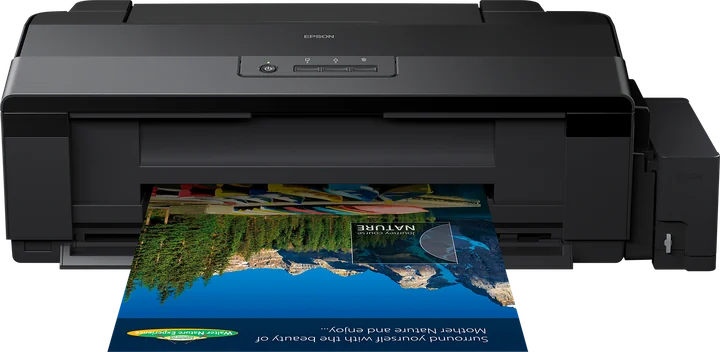
Yes. The Epson L1800 is supported in ZoroPrint on macOS, Windows and Linux. It is the most converted DTF printer in the world, and the RIP drives it on the same raster path as the L805, across a wider carriage. You need an L1800 converted to DTF inks, A3+ sheets or 33 cm roll film, powder and the RIP.
Converting the L1800 for A3+ sheets and roll film
The L1800 has six channels: cyan, magenta, yellow, black, light cyan and light magenta. A DTF kit fills two of them with white, so the head lays colour and white in one pass. ZoroPrint starts the L1800 with white in the M + C tanks, cyan in light cyan and magenta in light magenta. The other common kit, with white in light cyan + light magenta, is one click in Printer › Ink settings › Inks in the printer.
Follow your kit's instructions for the conversion itself. A conversion is done at your own risk and ends Epson's warranty. On this model, a roll feeder for 33 cm film is optional but worth it: the L1800 is the workhorse for gang sheets.
Then print the channel test on a strip of film. It prints one numbered block per physical channel. You read which tank holds white and which holds each colour, and the “Wrong colours?” assistant applies the mapping. The test never uses a Free job.
Starting settings for the L1800
Start with the RIP's defaults. They are the same as on the L805, because the head is the same.
| Setting | Default | Note |
|---|---|---|
| Resolution | 1440 × 720 | The everyday setting. 720 × 720 and 1440 × 1440 are also offered. |
| Ink limits | C 80 %, M 80 %, Y 70 %, K 70 % | Set per channel. |
| White density | 80 % | Of every dot the head can place. |
| White choke | 0.1 mm | Smart choke on. |
| Total ink limit | 200 % | With GCR at 60 %. |
Change a value only after a test print on film. Cracking transfers mean too much ink: see ink limits and cracking. For the white under dark and light garments, see white underbase.
What goes wrong on an L1800
- Wrong colours. A kit with white in light cyan + light magenta and an RIP on the M + C default sends white to colour tanks. The print comes out blue, pink or washed out. The channel test shows the real layout.
- Lines across a long roll print. Light lines on every pass are usually a missing nozzle: print a nozzle check first. Regular lines one head pass apart mean the film fed too much or too little; check that the roll is not dragging. The banding guide has the full order.
- White fades between jobs. White pigment settles within days. Stir the white tanks daily and print a purge strip every 2–3 days, as the white ink care guide explains.
- The gang sheet is too wide. The maximum print width is 329 mm. Set the sheet to your film, and let nesting fill the width with several designs.
- Two colour conversions. Photoshop converts, the RIP converts again and the colours drift. Convert once, in the RIP, with an ICC profile.
The L1800 and its relatives
The L1800 shares its head profile with the A4 L805, the printer whose command stream we checked byte-for-byte. The R1390 uses the same 90-nozzle head and channels, but with its own dot sizes, and starts with white in light cyan + light magenta. The L18050 is the L1800's successor; its profile is still experimental. Thinking about an XP-15000 instead? Read XP-15000 vs L1800. For film wider than 33 cm, the SC-P900 prints 432 mm, on an experimental profile. The full conversion is in converting an L1800 or L805.
Compatibility
- macOS 13 or later (Apple Silicon and Intel), Windows 10 and 11 64-bit, and Linux x64 (.deb or AppImage).
- USB: USB direct on macOS and Linux, the system queue on Windows. See the connection guide.
- No Epson driver renders the job. On Windows, the driver that Windows installs only passes the raw data through.
- No dongle. The licence is on your account, as a signed token for each computer.
- Paid plans print up to 30 days offline. The Free plan needs internet for every print: 30 print jobs a month, one computer.
Download ZoroPrint, load a strip of film in your L1800 and print the channel test first.
Laadi tasuta allaKorduma kippuvad küsimused
- What is the widest film for the L1800?
- 33 cm roll film, or A3+ sheets. The maximum print width is 329 mm.
- Does the L1800 work on an Apple Silicon Mac?
- Yes. ZoroPrint runs on macOS 13 or later on Apple Silicon and Intel, and drives the L1800 by USB with no Epson driver.
- Can I keep my kit's ink layout?
- Yes. The default is white in M + C; white in light cyan + light magenta is one click in the Printer tab. Any other layout can be set channel by channel, and the channel test confirms it.
- Should I convert an L1800 or an XP-15000?
- Read the XP-15000 vs L1800 guide for the full comparison. In ZoroPrint today, the L1800 is supported on a verified head profile; the XP-15000 profile is experimental until a physical channel test confirms it.