
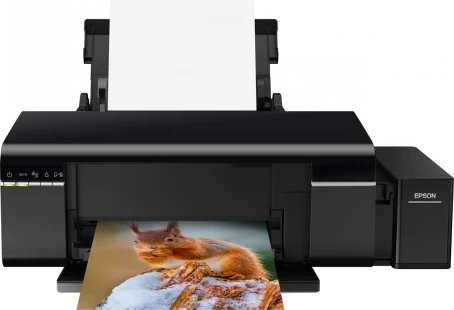
Yes. The Epson L805 is supported in ZoroPrint on macOS, Windows and Linux, and it is the printer the RIP was first built and verified on. You need an L805 converted to DTF inks, PET film, powder and the RIP; ZoroPrint sends the job to the printer itself, over USB or Wi-Fi.
Converting the L805: white in the cyan and magenta tanks
The L805 has six ink channels: cyan, magenta, yellow, black, light cyan and light magenta. A DTF kit puts white ink in two of them, so the head can lay colour and white in one pass. Kits differ on which two. ZoroPrint starts the L805 with white in the M + C tanks, cyan in the light cyan tank and magenta in the light magenta tank.
That default has a concrete reason. On 3 October 2026 we tested ZoroPrint on an L805 in a print shop, and that printer was built with white in M + C. The other common kit, with white in light cyan + light magenta, is one click away in Printer › Ink settings › Inks in the printer. For the conversion itself, follow your kit's instructions. A conversion is done at your own risk and ends Epson's warranty.
Before the first real job, print the channel test on a strip of film. It prints one numbered block per physical channel. You see which tank holds white and which tank holds each colour. If the blocks do not match the layout in the RIP, the “Wrong colours?” assistant rewrites the mapping for you. The test is a maintenance print, so it never uses a Free job.
Starting settings for the L805
These are the RIP's defaults. They are a sound place to start on a freshly converted L805.
| Setting | Default | Note |
|---|---|---|
| Resolution | 1440 × 720 | The everyday setting. 720 × 720 and 1440 × 1440 are also offered. |
| Ink limits | C 80 %, M 80 %, Y 70 %, K 70 % | Set per channel. |
| White density | 80 % | Of every dot the head can place. |
| White choke | 0.1 mm | Smart choke is on, so thin strokes keep their white. |
| Total ink limit | 200 % | With GCR at 60 %. |
Change a value only when a test print on film tells you to. Thin, grey white points to settled ink or a low white density. Transfers that crack point to too much ink: see ink limits and cracking. A white edge around the colour is a choke question: see white halo.
What goes wrong on an L805
- Wrong colours. If your kit has white in light cyan + light magenta but the RIP still has the M + C default, white goes to tanks that hold colour. The print comes out blue, pink or washed out. Print the channel test and pick the right layout, or use “Wrong colours?”.
- Fine horizontal lines. The L805 head has 90 nozzles per colour, and one missing nozzle shows as a light line on every pass. Print a nozzle check on film first, then follow the banding guide.
- White stops printing. White pigment settles in the tanks and lines within days. Stir both white tanks daily and print a purge strip every 2–3 days. The white ink care guide has the routine.
- The design does not fit. The L805 is an A4 printer with a maximum print width of 216 mm. Anything wider goes to an A3+ printer such as the L1800.
- Network jobs fail. Epson ships raw printing (port 9100) switched off. Turn it on first; the connection guide shows where.
Why the L805 is the reference printer
ZoroPrint was born on the L805. Its command stream, both the header and the weave, was checked byte-for-byte against the reference driver. The L800 and L1800 profiles use the same head definition: 90 nozzles per colour at 1/90 inch, with drops of 1.5, 3.5 and 6.5 pl.
Compatibility
- macOS 13 or later (Apple Silicon and Intel), Windows 10 and 11 64-bit, and Linux x64 (.deb or AppImage).
- USB, or the network over Wi-Fi on raw port 9100.
- No Epson driver renders the job: ZoroPrint sends the printer's own commands. On Windows, the driver that Windows installs only passes the raw data through.
- No dongle. The licence lives on your account, as a signed token for each computer.
- Paid plans keep printing for up to 30 days offline. The Free plan needs an internet connection for every print and gives 30 print jobs a month on one computer.
Related printers and guides
The Epson L800 is the USB-only twin of the L805 and uses the same profile. The Epson L1800 is the A3+ printer with the same head. The Epson L8050 is the L805's successor, with a 180-nozzle head; its profile is still experimental. For the whole conversion, read converting an L1800 or L805.
Download ZoroPrint, connect your L805 and print the channel test first.
Lataa ilmaiseksiUsein kysytyt kysymykset
- Does the L805 work on an Apple Silicon Mac?
- Yes. ZoroPrint runs on macOS 13 or later on Apple Silicon and Intel, and drives the L805 over USB or the network.
- What is the widest print on an L805?
- 216 mm, which is A4 width. For wider film, use an A3+ printer such as the L1800, which prints up to 329 mm.
- Can I keep my kit's ink layout?
- Yes. The default is white in M + C, and the other common layout, white in light cyan + light magenta, is one click in the Printer tab. You can also set any other layout channel by channel, and the channel test confirms it.
- Can I print to the L805 over Wi-Fi?
- Yes. Turn on raw printing (port 9100) in the printer first. Then choose Network in the Printer tab and type the printer's IP address.